Improve Server Response Time (TTFB & ART)
In a digital ecosystem where every millisecond impacts revenue and SEO ranking, server response time is a non-negotiable metric. This technical article explores modern architectures to break down Time to First Byte (TTFB), moving from backend tuning to Edge Caching solutions, offering a practical roadmap for CTOs, system builders and digital entrepreneurs.
Key Points of the Article:
- Analysis of the TTFB: Why getting below 200ms is vital for Core Web Vitals.
- Edge Architecture: How to serve static content without touching the source server.
- Technological Stack: Optimizing Database, PHP, and Web Server (NginX/Apache).
- Infrastructure: The role of CDNs (Cloudflare, Google Cloud) and choice of hosting.
TTFB vs ART: Understanding the Metrics that Matter
Before we get our hands on the Linux configuration, it is critical to distinguish what we are measuring. People often confuse page load speed with server responsiveness.
Time to First Byte (TTFB)
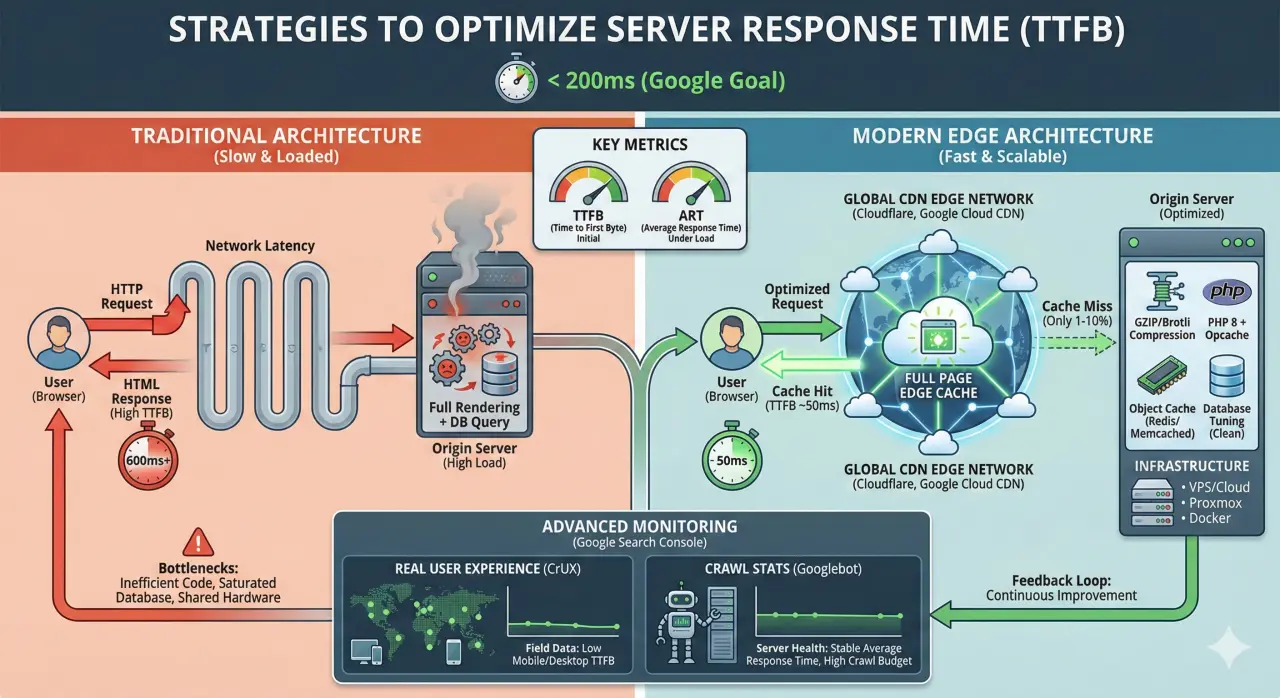
The TTFB measures the time between the client's HTTP request and the receipt of the first byte of data from the server. It is the "thinking time" of the machine. A high TTFB (above 600ms) indicates backend-side bottlenecks: inefficient code, slow database queries, or saturated hardware. Google recommends a TTFB of less than 200ms to ensure a smooth user experience.
Average Response Time (ART)
While TTFB is an initial point measure, ART (Average Response Time) evaluates server stability under load over time. A server that responds in 100ms with one user, but rises to 2 seconds with 100 users, has a problem with horizontal scalability or web server configuration (Apache or NginX).
Edge Caching: The "No-Rendering" Revolution
The traditional approach is that each request arrives at the server, which queries the database, processes the code (e.g., PHP or Python), and returns the HTML. This process consumes CPU and RAM.
The modern architectural solution to almost totally eliminate TTFB is Full Page Caching on the Edge.
How it works
Instead of rendering the page with each request, we serve a static copy (cache) updated directly from the CDN nodes closest to the user. The origin server ("Origin") is only contacted to generate the cache the first time or when the content changes.
Disadvantages and Disadvantages of Edge Caching
- Disadvantages:
- TTFB close to zero (often <50ms) due to geolocation.
- Load on the source server reduced by 90-99%.
- Resiliency: the site responds even if the backend is temporarily offline (Stale-while-revalidate).
- Disadvantages:
- Complexity in managing dynamic content (e.g., shopping carts, user logins).
- Need for precise cache invalidation (Purging) strategies to avoid showing obsolete content.
CDN Strategies: Cloudflare and Google Cloud
A Content Delivery Network (CDN) is essential to reduce geographic latency. As highlighted in the technical analysis, if your server is in Texas and the user is in Tokyo, data must travel through undersea cables, accumulating delay.
Google Cloud CDN
For infrastructure hosted on Google Cloud Platform, the natural choice is Google Cloud CDN. Leveraging Google's global fiber network, it offers intelligent caching and natively integrates with Load Balancers, providing enterprise performance and built-in security.
Cloudflare
The market leader in ease of use and performance. In addition to caching, Cloudflare offers DDoS protection and automatic image optimization. Proper implementation of "Page Rules" on Cloudflare allows you to granularly define what should be served by the Edge cache and what should go through the server.
If you need an Enterprise setup without configuration risks, discover our Cloudflare Consulting Services
Backend Optimization: Cache, Compression, and Database
If the request needs to reach the server, we need to make sure the server responds immediately. Here are the priority technical interventions.
1. Database Tuning and Cleaning
The database is often the bottleneck. Tables that are not indexed or full of "junk" data (post revisions, spam comments, transient logs) slow down queries. Regular maintenance and the use of Object Caching (such as Redis or Memcached) dramatically reduce the load on MySQL/MariaDB.
2. GZIP Compression and Brotli
Enabling compression is like "zipping" files before sending them. GZIP is the standard that can reduce the size of text files (HTML, CSS, JS) by up to 80%. For those seeking even higher performance, the Brotli algorithm (supported by modern NginX and Apache servers) offers a better compression ratio than GZIP.
3. PHP and Object Cache
Be sure to use recent versions of PHP (8.x) with Opcache enabled. For complex environments, implementing DevOps solutions such as Varnish Cache in front of the web server can make the difference between a site that holds 10 users and one that holds 10.000.
The Infrastructure: Shared vs. VPS vs. Cloud
Software can't work wonders if the underlying hardware is a structural limitation. Much of the instability of TTFB arises precisely from the use of shared hosting, where resources are brutally contested among hundreds of "noisy neighbors" (Noisy Neighbors). When tuning is no longer enough, the only real cure is the designing scalable and optimized cloud infrastructures. A tailored approach that allows you to ditch legacy servers and pay only for the resources you actually use.
- VPS / Cloud Servers: Guaranteed resources. We recommend robust distributions such as Debian or Ubuntu Server for maximum stability.
- Proxmox Virtualization: For those managing proprietary infrastructures, Proxmox enables orchestration of containers and VMs with bare-metal efficiency.
- Containerization: The use of Docker allows you to isolate services and ensure that the development environment is identical to the production environment, eliminating unforeseen variables.
Advanced Monitoring: Beyond Lab Testing
You can't improve what you don't measure. Tools like PageSpeed Insights provide a snapshot ("Lab Data"), but for professional diagnosis we need to analyze the actual history via Google Search Console.
1. The Real User Experience (CrUX)
The Chrome User Experience Report (CrUX), which can be seen in the Core Web Vitals section of the Search Console, aggregates real browsing data from Chrome users.
Unlike a single test, the CrUX reveals to you whether the TTFB is high only for those browsing from 4G mobile networks or specific geographic areas. If the average TTFB in CrUX is high, it means that your real users are waiting, regardless of how fast your office cable test is.
2. Crawl Statistics (Crawl Stats)
To understand the bare health of the server, we need to look at Googlebot's eyes. By going to Settings > Crawl Stats, you will find the graph "Average Response Time".
- What to look for: Sudden spikes in page download time.
- The Impact: If Googlebot detects a high response time, it will reduce the crawl frequency (Crawl Budget) to not overload the server. Result. Your new content will be indexed more slowly.
Frequently Asked Questions (FAQ)
What is a good TTFB value?
Google recommends staying below 200ms. Values between 200ms and 500ms require attention, while above 600ms requires urgent action on the infrastructure.
Better Apache or NginX for response time?
NginX is generally better at handling concurrent connections and static files due to its event-driven architecture, making it ideal as a reverse proxy and for reducing TTFB.
Does a CDN replace good hosting?
No. A CDN masks server slowness for static content, but for dynamic requests (checkout, admin panel) the speed of the source server remains crucial.
Is your TTFB still too high? Request an Infrastructure Audit
From Linux and Web server tuning to advanced CDN and Cloud architectures implementation, our team is ready to cut your project's response time. We eliminate bottlenecks at the root.