
Advanced NginX Management: Optimization, Security and NginX Proxy Manager
In the modern web infrastructure landscape, NginX management is no longer just an ancillary technical skill, but a key pillar for ensuring performance, security, and scalability. Whether you are the CTO of a growing startup or manage a web agency with hundreds of domains, the way you configure your traffic "gatekeeper" (the Reverse Proxy) determines the resilience of your online business.
In this definitive guide we will explore the NginX ecosystem, analyzing both the "purist" command-line approach and modern solutions such as NginX Proxy Manager, to help you choose the architecture that best suits your business needs.
📌 Key Points of the Article
- Architecture and Efficiency: Why NginX handles high traffic better than traditional servers.
- CLI vs GUI: When it pays to use the command line and when to rely on NginX Proxy Manager.
- SSL Security: Automation of Let's Encrypt certificates and management of Reverse Proxies.
- Enterprise Strategy: Best practices for CTOs and Agencies in managing scalable infrastructure.
What is NginX: Beyond Simple Web Server
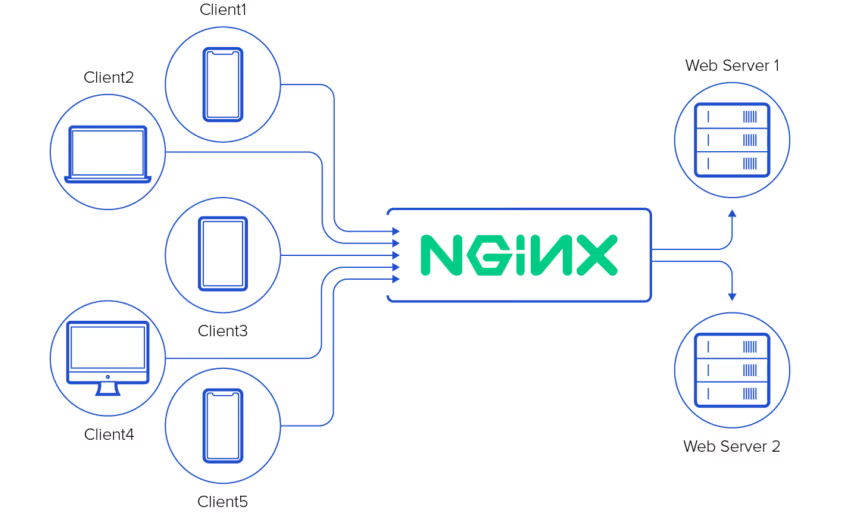
Born to solve the famous C10k problem (handling ten thousand simultaneous connections), NginX is much more than just a web server for serving static HTML files. It is a powerful Reverse Proxy, Load Balancer and HTTP Cache.
Unlike Apache, which creates a new process or thread for each request (quickly consuming RAM), NginX uses a event-driven and asynchronous architecture. This makes it the de facto choice for those who need to handle high volumes of traffic with limited hardware resources.
The Reverse Proxy Concept: Imagine NginX as the receptionist at a large corporate hotel. He greets customers (web requests), checks their documents (SSL/Security), and routes them to the correct office (the Docker container or application backend), without the customer ever having to know where the office is physically located.
"Hardcore" Management: NginX via CLI
For senior SysAdmins and Enterprise infrastructures, direct management of configuration files remains the standard. This approach provides granular control over each individual HTTP header.
Key configuration files
On Linux systems (such as Ubuntu or Debian), management is typically done in /etc/nginx/. The logical structure provides:
nginx.conf: The global brain of the server (worker processes settings, logging, Gzip compression).sites-available/: Where you create the configuration files (vhost) for each domain.sites-enabled/: Where you create the symlinks to actually activate the sites.
To delve deeper into the syntax of directives, the most authoritative resource remains the Official NGINX Documentation.
The GUI Revolution: NginX Proxy Manager
Not all situations require the complexity of the command line. For developers, web agencies, and Docker-based environments, NginX Proxy Manager (NPM) has become an indispensable tool.
NPM is an open-source graphical user interface (GUI) that abstracts the complexity of the underlying configuration. It allows you to manage domains, redirects, and TCP streams through an intuitive web dashboard.
Why choose NginX Proxy Manager?
- Automatic SSL Management: Native integration with Let's Encrypt. You can apply for and renew SSL certificates with a single click.
- Docker-Native: It installs in seconds via
docker-compose, making it perfect for containerized environments. - Access Lists: It allows you to protect access to internal services (such as databases or administrative dashboards) without having to manage complex VPNs.
However, NPM is not a "magic wand." For very high-load configurations or very specific caching rules, the GUI might be limiting compared to pure code.
Strategic Comparison: CLI vs Proxy Manager
How to choose the right path for your business? Here's a quick comparison to guide the CTO's decision.
| Feature | NginX (CLI / Raw Config) | NginX Proxy Manager (GUI) |
|---|---|---|
| Target | SysAdmin, DevOps, Enterprise | Devs, Homelab, Web Agency, SMEs |
| Flexibility | Total (any module/directive) | High (limited by UI options) |
| Setup SSL | Manual (Certbot via CLI) | Automatic (1-click) |
| Learning curve | Immediate | |
| Maintenance | Requires automation (Ansible/Terraform) | Backup of SQLite/MySQL database |
Managing a Mail Server or critical Linux infrastructure takes time and vertical expertise. A configuration error can cost hours of downtime.
Security and Performance Best Practices
Depending on the tool you choose for NginX management, there are golden rules to follow to ensure that your server does not become a sieve.
1. Security hardening
Hiding the version of NginX is the first step to avoid automated attacks. Also, implementing security headers such as HSTS (HTTP Strict Transport Security) and X-Frame-Options is critical. You can test your configuration using authoritative tools such as Mozilla Observatory.
2. Performance Optimization (Gzip and Caching)
Make sure Gzip or Brotli compression is enabled to reduce the size of files sent to clients. Properly configuring the caching of static files (images, CSS, JS) can reduce the load on the server by 40-50%.
3. Log Monitoring
A 502 Bad Gateway error will not resolve itself. Constantly monitoring access.log and error.log is vital. In production environments, we recommend centralizing these logs on ELK stacks or similar solutions.
Frequently Asked Questions (FAQs)
What is the main difference between NginX and Apache?
NginX uses an event-based (asynchronous) architecture, which makes it much faster and lighter in handling many simultaneous connections than Apache's process-based architecture. They are often used together: NginX as the front proxy and Apache as the backend.
Is NginX Proxy Manager safe for use in production?"
Yes, it is safe for most standard web applications and SMBs. However, for banking, healthcare or enterprise critical environments, "Infrastructure as Code" (IaC) management without a GUI is often preferred to have more rigorous audit trails.
What does error 502 Bad Gateway in NginX mean?"
It means that NginX (the proxy) fails to communicate with the backend server (e.g. PHP-FPM, Node.js or a Docker container). Usually indicates that the backend service is turned off or configured on the wrong port.
Further reading: Read our guide to Error 502 Bad Gateway, to understand this error and possible solutions
.